The internet’s a wonderful thing, isn’t it? A source of infinite knowledge and entertainment. Still, with millions (if not billions) of websites out there, how do you know what’s good, or find the cool websites that others don’t know about?
Well, one day I was browsing the “front page of the internet” (reddit), and came across this thread of underrated websites that should have more exposure. There, I found some really cool sites, and so decided to round up the best ones (in my opinion) and present them to you, dear readers. Here they are!
Seven of Miguel’s eight picks are still up and still useful, a couple of them with paid tiers worth knowing about. The eighth, a map of airport WiFi passwords, was taken down by Google, so it gets an honest obituary near the end instead of a number. Under each site you’ll find what it does today, what’s free, and the catch. The picks and the memories are Miguel’s; every source is listed at the bottom.

In this article
At a glance
| What this is | Miguel’s list of cool websites, with every link checked and working |
|---|---|
| Still working | GeoGuessr, Pluto TV, 10 Minute Mail, JustWatch, MyFridgeFood, This to That and Budget Bytes |
| Gone | The airport WiFi password map. Google took it down for a policy violation, and its creator moved the passwords into WiFox, a paid app |
| Free, with fine print | Pluto TV runs ads. 10 Minute Mail addresses expire. JustWatch is free to search, but the services it points to set their own prices |
| Free tier plus a paid upgrade | GeoGuessr limits free play and sells a Pro subscription. Budget Bytes recipes are free; BudgetBytes+ is an optional membership |
| Worth knowing | GeoGuessr asks for a signup before play. CNBC left Pluto TV in March 2019. Vudu is now Fandango. The Budget Bytes app page is gone from Apple’s App Store |
Cool Website Finder
Tell it what you want to do and the right pick from this list appears, with the reason and a link. Tap or click to open.
Pick a button and the matching site appears here, with the reason and a direct link.
1. GeoGuessr
Have you ever wondered what would happen if you were suddenly teleported to a random spot somewhere on earth? Could you quickly tell where you are, just based on your surroundings?
If that sounds like an awesome challenge, you’ll find the next best thing on GeoGuessr, a game that “drops” you into the middle of somewhere by using Google Street View. Your challenge is to pinpoint where you are, based on nothing but what you see on your screen and by exploring your surroundings using Street View’s navigation.
It reminds me of when I used to play Where in the World is Carmen Sandiego as a kid, and is an excellent way to go down an internet rabbit hole. Take a look:
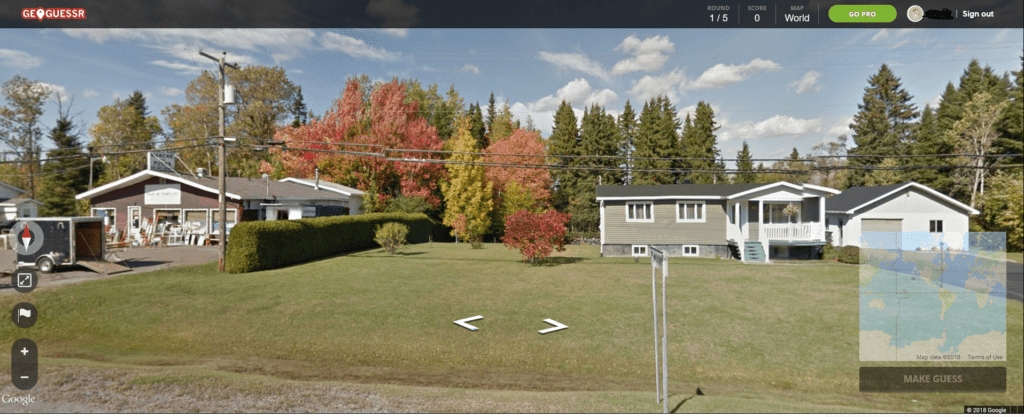
To make matters even more impressive, you can create an account and keep score, or narrow down the maps to famous places or certain countries. You can also add friends and see who’s the greater geography whiz. So, give it a try!
The 2026 check: GeoGuessr has grown up. A Swedish IT consultant, Anton Wallén, built it in 2013, and it now hosts a world championship (the 2026 edition was held in Berlin). The classic game is still five rounds, each worth up to 5,000 points, so a perfect game is 25,000. Players read road signs, utility poles, license plates and even the position of the sun to place their pin.
The catch is the price of admission. The homepage now says “Sign up to play,” and the Pro page lists a limited option that is free to try with no credit card, beside paid plans with unlimited play, no ads and private parties for friends. Wikipedia’s summary adds that free players can only play a certain amount and miss custom maps and the competitive modes. It runs in a browser, on iPhone and Android, and on Steam.
2. Pluto TV
Want to watch live TV, for free? Then click on over to Pluto TV, which is just that. It even has a cable-like channel guide. You can watch popular channels like CNBC with no problem at all.
The 2026 check: one line of that aged fast. Weeks after this list ran, Cord Cutters News reported in March 2019 that CNBC had ended its partnership with Pluto TV. (It had never been the live CNBC feed, just a 24/7 channel of CNBC clips and shows.) The rest still holds. Pluto TV’s homepage promises hundreds of live channels and thousands of movies and shows, and states the deal plainly: “All free, no payment required. Ever.”
The catch is ads, and Pluto TV doesn’t hide it. Its FAQ says short commercial breaks pay for everything. You don’t need an account to watch; a free profile syncs your favorite channels and watch list across devices. It runs in a web browser and on phones, smart TVs, Roku, Fire TV, game consoles and more. For more free entertainment hiding in plain sight, a library card is the other underrated pass worth carrying.
3. 10 Minute Mail
Don’t you just hate having to hand over your e-mail address to sign up to access some sites, only to then have them e-mail you every day? Well, with 10 Minute Mail, problem solved!
As soon as you land on the page, you’ll receive a temporary e-mail address that lasts 10 minutes (you can extend it for 10 more minutes). You can receive e-mail there (so you can confirm it with whatever site you’re signing up for). This cool website is a neat little tool to eliminate one of life’s annoyances.
Just remember that your new inbox is not permanent, so don’t use it if you’ll need to continue receiving messages there.
The 2026 check: still at 10minutemail.net, still free, and still a countdown clock. The page now has a “Give me 10 more minutes!” link and says you can stretch an address to 100 minutes in total. A just-expired mailbox can be recovered for a short while before it is removed, and addresses are randomly generated and never reused.
The catch is that some websites refuse throwaway addresses. The service says it swaps its email domain every 45 days to stay ahead of the admins who block it. It runs on donations rather than a subscription. And Miguel’s warning still stands: an inbox that vanishes is no place for anything that needs to reach you later.
4. JustWatch
You know when you want to watch a particular movie or TV show by streaming it, but don’t know where it’s available? Is it on Netflix, Amazon Prime, or Vudu?
With JustWatch, all you have to do is select your country, and search for the movie or show. Most likely it’ll find it, and tell you the price on each service, as well as whether it’s for sale or rent (or both) and the streaming video quality. Useful, eh?
The 2026 check: very useful, and bigger. The homepage now lists about 130 country editions. A check of the Interstellar page on October 16, 2026 found it on 12 streaming services, split into subscription, rent, buy and disc options, with HD or 4K labels and a note that it was leaving one service in 15 days. The page said JustWatch had checked 374 services that day. You can also build one watchlist that spans every service and ask to be notified when a title arrives somewhere new.
One name in Miguel’s example has changed twice. Vudu became Fandango at Home on March 12, 2024, and in 2026 the “at Home” was dropped and the service became simply Fandango, according to Wikipedia. JustWatch still files it under “Fandango At Home.” The catch: JustWatch now runs its own rental store, JustWatch TV, and some listings carry a “Promoted” tag, so treat the top of the list as a placement, not a verdict.
5. MyFridgeFood
Not sure what to have for dinner? Enter MyFridgeFood, a cool website that lets you select the food you have in your fridge, and then shows you recipes you can make with it. Check it out, in two steps:
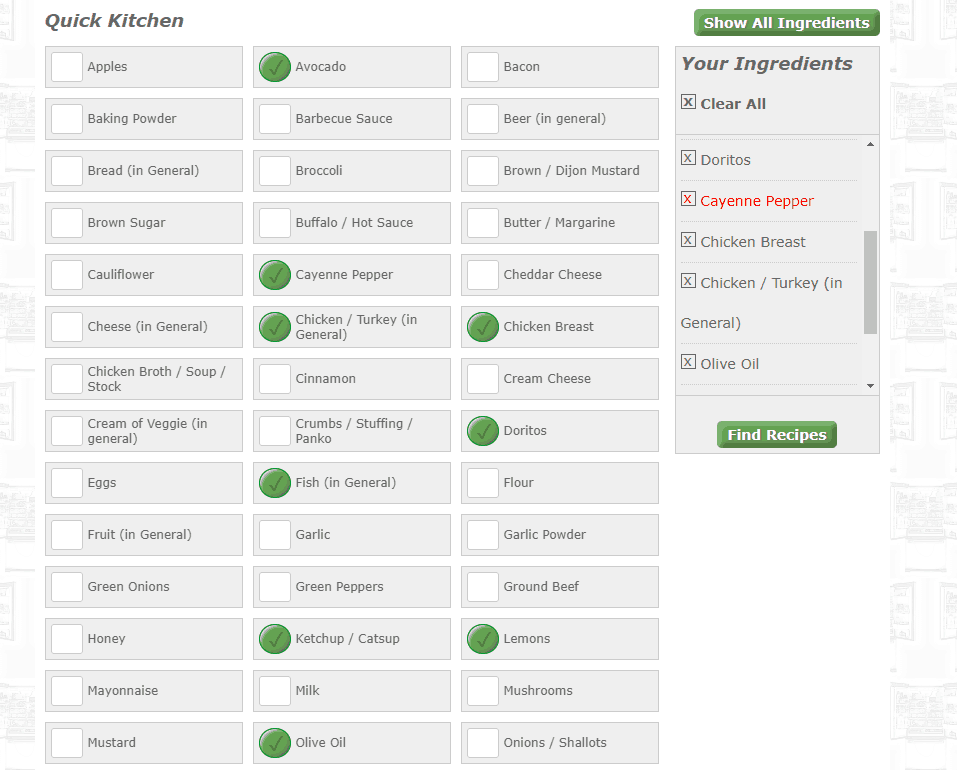
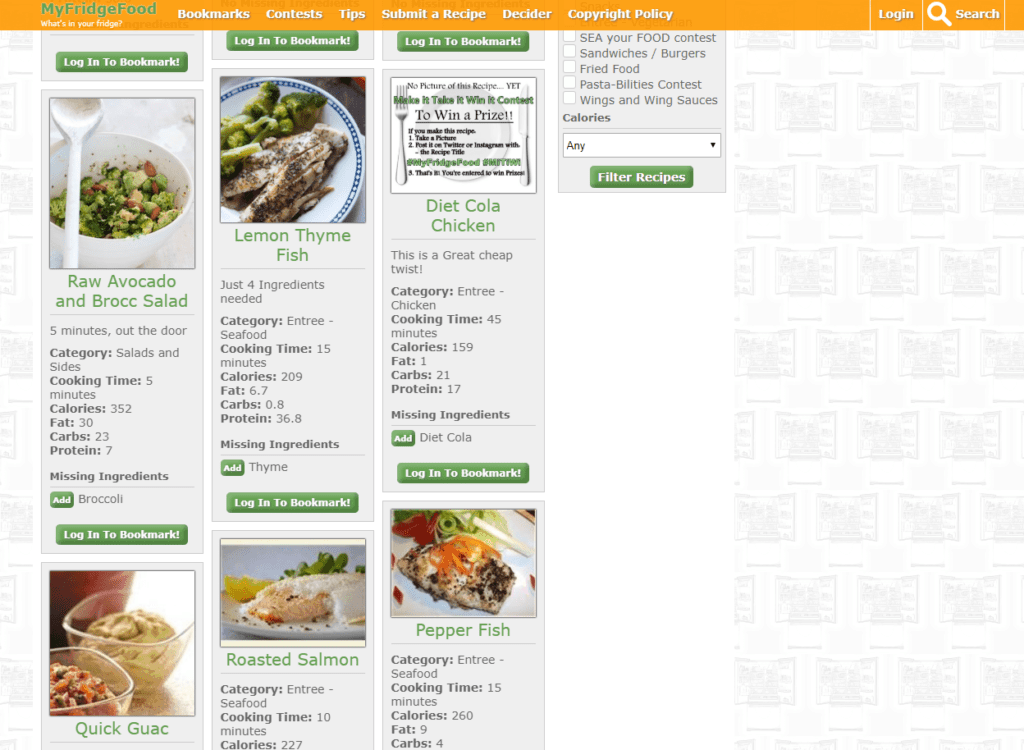
The 2026 check: the picker is still the whole show, and it still looks a lot like Miguel’s 2018 screenshots. A short “Quick Kitchen” list sits up top, with a link to the full ingredient list, which runs from allspice to zucchini with a few surprises in between (Baileys, and a lone Twinkie). Tick what you have, then press Find Recipes; a quick reCAPTCHA check stands between you and dinner.
There is a free login for saving bookmarks, a page for submitting your own recipes, and iPhone and Android apps linked from the homepage. We saw no price or paywall on the homepage. The catch is polish: the list has its quirks, including a stray entry called “test” and a “Teriaky Sauce,” and chicken alone shows up under several separate entries, so tick every one that applies.
6. This to That
Talk about a strange (but occasionally useful) site. When you need to glue two materials together, just select them on This to That. It’ll spit out the glue you need right away (well, it’ll tell you the kind of glue that you need to buy).
The 2026 check: gloriously unchanged. The tagline still reads “Because people have a need to glue things to other things,” and the menus still offer the same 11 materials on each side: ceramic, fabric, glass, leather, metal, paper, plastic, rubber, Styrofoam, vinyl and wood. A ceramic-to-wood test this week returned two specific recommendations, LePage’s 5 Minute Epoxy or LePage’s Bull Dog Grip, each linked to a page about that glue.
The catch is that it names products, not prices, and there are only 11 materials, so anything off the list, marble say, means picking the nearest match. The homepage copyright reads 1999 to 2024, while the results page says 2023, which is about as much drama as this website has ever had.
7. Budget Bytes
Need cheap meals? Then check out BudgetByte$, a site that’ll show you delicious-looking recipes that come at a very low cost. It’ll reveal the cost per recipe and per serving, so you know how much you’ll need to spend.
The 2026 check: Budget Bytes (Miguel spelled it with a dollar sign, which felt right) still prints both numbers on nearly every recipe card on the homepage. Beth Moncel founded it in 2009, and it now counts more than 1,700 recipes, with categories you can browse by cost, plus chicken, pasta, one-pot, vegetarian and slow cooker.
Two things changed. Miguel’s 2019 version mentioned an app; the old App Store page now returns “not found,” and the website does the job on its own. And there is now an optional paid membership, BudgetBytes+, which adds weekly meal plans and removes the ads. The recipes themselves stay free. For a crowd, this desk’s build-your-own pizza night guide runs the whole party, math included.
The One That Didn’t Survive: Airport WiFi Passwords
In 2019 this was number six on the list, and Miguel described it this way: exactly what it sounds like. The site (actually, a Google Map) gave you the WiFi password at airport terminals and lounges around the world. A neat tool for when you need to get connected.
His one caveat was to look up the passwords in advance, at a place where you have internet access. That way, you won’t find yourself at the airport unable to use the internet to access the site that has the WiFi password!
The 2026 check: that link is dead, and this time we can prove it. The map now loads a Google notice that it “is no longer available due to a violation of our Terms of Service and/or policies,” while other public maps open normally from the same connection. The map belonged to Anil Polat of the travel and tech site foXnoMad. A reader reported the removal in his comments in April 2024, and he pointed people to WiFox, his app. A newer map on his page now carries the note: “Unfortunately Google doesn’t want me to post the passwords directly in the map any more.”
WiFox is a paid app for iPhone and Android with an offline map, passwords that travelers submit and he verifies, and an optional premium subscription. Its App Store listing claims more than 700 airports and had a 3.7 rating from six reviews in October 2026. We haven’t tested it, so it doesn’t get Miguel’s number. If you just want to get online in the air, this desk’s cheat sheet on which US airlines have free Wi-Fi covers the onboard side.
Want More Cool Websites?
Here is a tight nine-minute tour of ten more useful websites from the tech channel Brett In Tech. It covers other sites rather than Miguel’s picks, so think of it as a second round of the same discovery game.
Summing It Up
Well, there you have it. If you need to make your life easier or entertain yourself, make sure to check out these cool sites if they suit your needs.
Nearly eight years is a long time on the internet. A glue picker with a 1999 copyright line outlived a Google Map, and a geography game went pro. Bookmark the survivors, and look up that airport password before you leave the house.
See you next time!

What are your favorite little-known sites?
Frequently asked questions
Are these cool websites free?
Mostly, with fine print. This to That and MyFridgeFood showed no price or paywall when we checked in October 2026. Pluto TV is free because it plays short ad breaks. 10 Minute Mail is free, but the address expires. JustWatch is free to search, though the services it points you to charge their own prices. GeoGuessr offers limited free play and sells a Pro subscription, and Budget Bytes keeps its recipes free while selling an optional BudgetBytes+ membership.
Is GeoGuessr still free to play?
Partly. The homepage asks you to sign up before you play, and the Pro page lists a limited option that is free to try with no credit card, beside paid plans with unlimited play and no ads.
What happened to the airport WiFi password map?
Google took it down. The My Maps page now says the map “is no longer available due to a violation of our Terms of Service and/or policies.” Its creator, Anil Polat of the travel and tech site foXnoMad, keeps the passwords in WiFox, a paid app for iPhone and Android.
Is Pluto TV really free?
Yes. Its homepage says “All free, no payment required. Ever.” Its own FAQ explains the trade: short commercial breaks pay for the live channels, movies and shows.
What is 10 Minute Mail used for?
One-time sign-ups. You get an email address that works for ten minutes, extendable on the page in ten-minute steps up to a hundred minutes in total, which is enough to catch a confirmation message without handing over your real inbox. Never use it for anything you will need to hear about later.
Which of these websites finds where a movie or show is streaming?
JustWatch. Pick your country, search the title, and it lists the services that stream, rent or sell it, with the video quality and a warning when a title is about to leave a service. It now runs its own rental store, JustWatch TV, and some listings are marked as promoted, so the top spot may be an ad.
Sources
All sources below were read in October 2026.
- GeoGuessr: homepage
- GeoGuessr: GeoGuessr Pro plans
- Wikipedia: GeoGuessr
- Pluto TV: homepage and FAQ
- Cord Cutters News: Pluto TV Loses CNBC But Adds Content From The Weather Channel (March 26, 2019)
- 10 Minute Mail: homepage
- JustWatch: homepage
- JustWatch: Interstellar: where to watch
- JustWatch: Fandango At Home provider page
- Wikipedia: Fandango (streaming service)
- MyFridgeFood: homepage and ingredient picker
- This to That: homepage
- This to That: Ceramic to Wood result
- Budget Bytes: homepage
- foXnoMad: A Map Of Wireless Passwords From Airports And Lounges Around The World
- foXnoMad: WiFox Is A Continuously Updated Map Of Wireless Passwords
- Apple App Store: WiFox listing
- YouTube: Brett In Tech, 10 Useful FREE WEBSITES You Didn’t Know Existed!
- Google My Maps: the airport WiFi map linked in 2019 (map ID 1Z1dI8hoBZSJNWFx2xr_MMxSxSxY), which now shows a terms-of-service takedown notice; not linked because it no longer loads
- Apple App Store: the former Budget Bytes app page (ID 1240079167), which returned “not found”; not linked for the same reason
- Reddit: the r/AskReddit thread that started this list in 2018; Reddit blocks automated reads, so its existence was confirmed through search results
Updated October 2026 by Richie with the help of modern digital tools.


Interesting Miguel. I wonder how the app knows what I have in my fridge when I don’t even know? Tom
I’m totally bookmarking this page! There are some really cool sites to show the students in my classroom if we ever have some downtime (or maybe on the last day of school). Thanks so much!
I just heard about 10 minute mail. Sounds really cool. One thing I wonder about is whether shopping places will start figuring out the e-mail addresses are part of this and end up blocking them.
The GeoDrop sounds really cool. Going to have to try that.